If your application is already a Django app, Django admin is very hard to beat, and this page will not pretend otherwise. It lives inside your codebase, shares your models, your auth and your deploy pipeline, and its ecosystem — import/export, simple-history, filters, themes — is enormous and mature after two decades.
The comparison only gets interesting when the database was not born from Django. Then Django admin asks you to run inspectdb, hand-correct the generated models, and keep them in sync with every migration anyone else ships — forever. The ORM layer, not the database, becomes the source of truth, and it drifts.
cartapel inverts that: the live schema is the model. It introspects Postgres, MySQL or MariaDB at boot, so a new column shows up without regenerating anything, and the panel runs as a single binary beside any stack — Rails, Go, Node, Elixir, or a database no application owns.
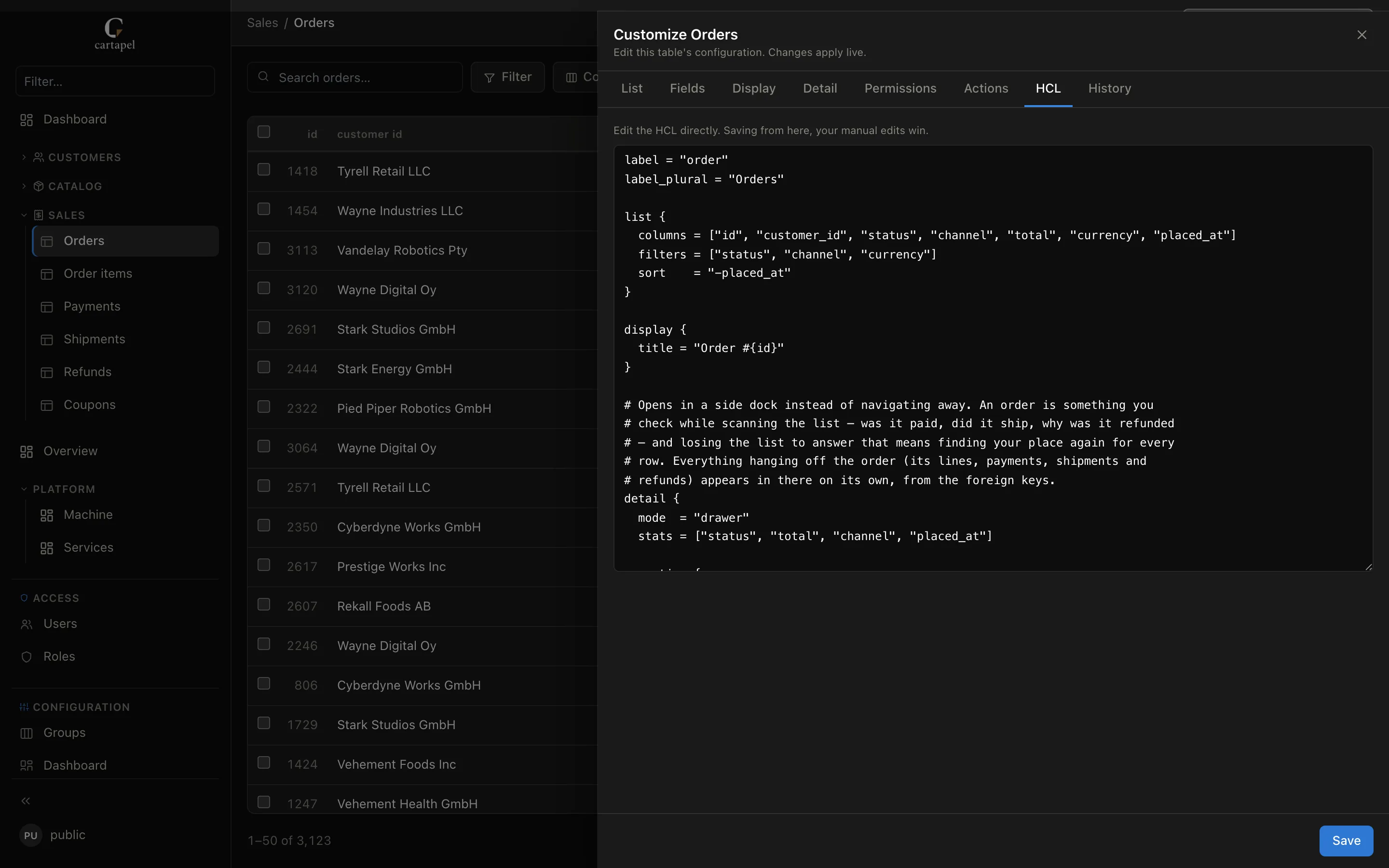
No models, no admin.py: the file the panel reads is the file you review — and you can write it by clicking.
Side by side
cartapel
Django admin
What it needs to run
One Rust binary
A Django project, Python runtime and WSGI/ASGI server
Existing database you do not own
Introspects the live schema; nothing to sync
inspectdb, then hand-corrected models kept in sync forever
Databases
Postgres, MySQL, MariaDB (+ ClickHouse read-only)
Whatever Django supports, through models
Customization
Visual editor or HCL by hand — both produce files in git, reviewed in PRs
Python in git — ModelAdmin classes, full escape hatch
Audit log
Built in — before/after diff, one-click revert
LogEntry covers admin actions; full history via packages
Dashboards
SQL tiles, charts and template variables
Not built in
Ecosystem
Young — widgets are small JS files you drop in
Two decades of third-party packages
License
MIT, free, no seats
BSD, free
Yellow cells are nuanced — the sections below say why.
Where Django admin is the better answer
You are already a Django shop. The models exist, they are correct, and the admin inherits your auth, permissions, signals and tests for free. Adding a second service to do what you already have is a loss.
You need arbitrary Python at the edges. A save_model that fires a Celery task, a form with cross-field validation, a custom view mounted in the admin — Django lets you write anything, because it is your application.
The ecosystem is the feature. django-import-export, django-simple-history, django-admin-rangefilter and a hundred more, all installable today.
Where cartapel is the better answer
The database is not a Django database. No models to generate, no drift, no managed = False archaeology. Point it at the URL and the panel exists.
You would be adopting Python just for the admin. A Go or Node team should not run a Django app in production to let support fix a row.
Audit and dashboards out of the box. Every write is logged with a before/after diff and a revert button, and SQL tiles are a block of HCL rather than a third-party package plus a template override.
The config is small enough to review. An empty screen.hcl is already a working table; the diff in a pull request is five lines, not a Python class.
The same jobs, side by side
Glance left → right. Everything on the right is the whole customization — no model,
no build step, no Python.
Expose a tableDjango needs a model · cartapel reads the live schema
Django
# models.py — or inspectdb forever
class Order(models.Model):
    customer = models.ForeignKey(...)
    status = models.CharField(...)
    total = models.DecimalField(...)
    placed_at = models.DateTimeField(...)

# admin.py
@admin.register(Order)
class OrderAdmin(admin.ModelAdmin):
    pass
cartapel
# screens/sales/orders/screen.hcl
# empty file → working list already
# (search, filters, sort, FKs as links)
Shape the listlist_display / list_filter / ordering
No login. Click anything — the demo resets on a schedule.
Questions people actually ask
Can I run cartapel next to an existing Django admin?
Yes, and it is a common shape: Django admin for the engineers who live in the codebase, cartapel for support and ops, with its own roles, column masking and audit trail. They read the same database and neither owns the schema.
Do I lose Django signals and model validation?
Yes — cartapel writes to the database, not through your ORM, so Python-level signals and validators do not fire. Constraints, triggers and defaults in the database still apply. If your invariants live only in Python, keep those tables out of cartapel or move the rule into the schema.
Does it handle Django auth tables?
It can browse them like any other table, but password hashing is a Django concern. Treat user credentials as read-only and mask hash columns; cartapel masks secret-shaped columns by default.
Is there an inspectdb equivalent?
There is nothing to run. Introspection happens at boot and on demand, so a migration shipped by another team is visible in the panel without a code change on your side.